Prompt and transcript
A session buffer contains the transcript at the top, a prompt input area below a divider, and a footer at the bottom. The transcript is read-only text with its own local keymap attached via text properties, allowing single keys to trigger commands. The prompt area has no such property and follows the major mode map (binding only RET, TAB, movement keys, and C-c C- prefixes), so normal character typing is preserved.
The prompt region
Section titled “The prompt region”Writing and sending
Section titled “Writing and sending”| Key | Action |
|---|---|
RET |
Insert newline (or send, if ecc-chat-return-sends is enabled) |
S-RET, C-j |
Insert newline |
C-c C-c |
Send prompt |
C-c C-k |
Clear prompt area |
C-k |
Kill visual line (bounded by prompt area) |
C-a / C-e |
Move to beginning / end of visual line |
TAB |
Complete slash command or @ reference |
/ |
Insert slash (shows commands when pressed at an empty prompt) |
Prompt history and suggestions
Section titled “Prompt history and suggestions”| Key | Action |
|---|---|
M-p / M-n, C-<up> / C-<down> |
Previous or next prompt from history |
C-c C-r |
Resend last prompt |
C-c C-s |
Accept CLI prompt suggestion |
Prompt history is shared across all sessions, so a prompt typed in one session is immediately available in another.

The CLI may suggest a follow-up prompt after a turn or two. Suggestions appear in the empty prompt area as ghost text; press C-c C-s to accept it as an editable draft.

Suggestions appear only when ecc-prompt-suggestions-enabled is non-nil (which passes --prompt-suggestions to the CLI). Note that not all models support suggestions.
Prefix keybindings (C-c C-)
Section titled “Prefix keybindings (C-c C-)”| Key | Action |
|---|---|
C-c C-q |
Show queued prompts |
C-c C-g |
Interrupt running turn |
C-c C-x |
Toggle editor context attachment |
C-c C-i |
Insert image |
C-c C-a / C-c C-d |
Allow or deny pending request |
C-c C-n / C-c C-p |
Move to next / previous turn |
C-c C-b |
Show /btw side-queries |
C-c C-t |
Switch window to another session |
C-c C-e |
Export conversation as Markdown |
S-TAB |
Cycle permission mode |
C-c ? |
Open transient menu |
C-c C-a and C-c C-d allow responding without leaving the prompt area: they answer the request at point if one exists, otherwise the oldest pending request in this session, or finally the oldest across all sessions.
@ references
Section titled “@ references”
@ in a prompt references context for Claude to read. TAB completes available references — including those listed below, as well as project files.
| Reference | Description |
|---|---|
@region |
Active region, formatted as a quoted code block |
@cursor |
Current line at point, including surrounding context lines |
@diagnostics |
Diagnostics (Flymake/Flycheck) for the current buffer |
@path:10-40 |
Specific lines (e.g. 10–40) of the named file |
@path |
File path reference resolved directly by the CLI |
Emacs expands the first four references before sending: each reference is replaced by a short label in the prompt, and the referenced content is appended in a quoted block below a divider (duplicate references share a single block). The echo area confirms attached content and warns if @region was used without an active selection.
The region, cursor, and diagnostics are captured from the buffer you were editing before switching to the session buffer.
Slash commands
Section titled “Slash commands”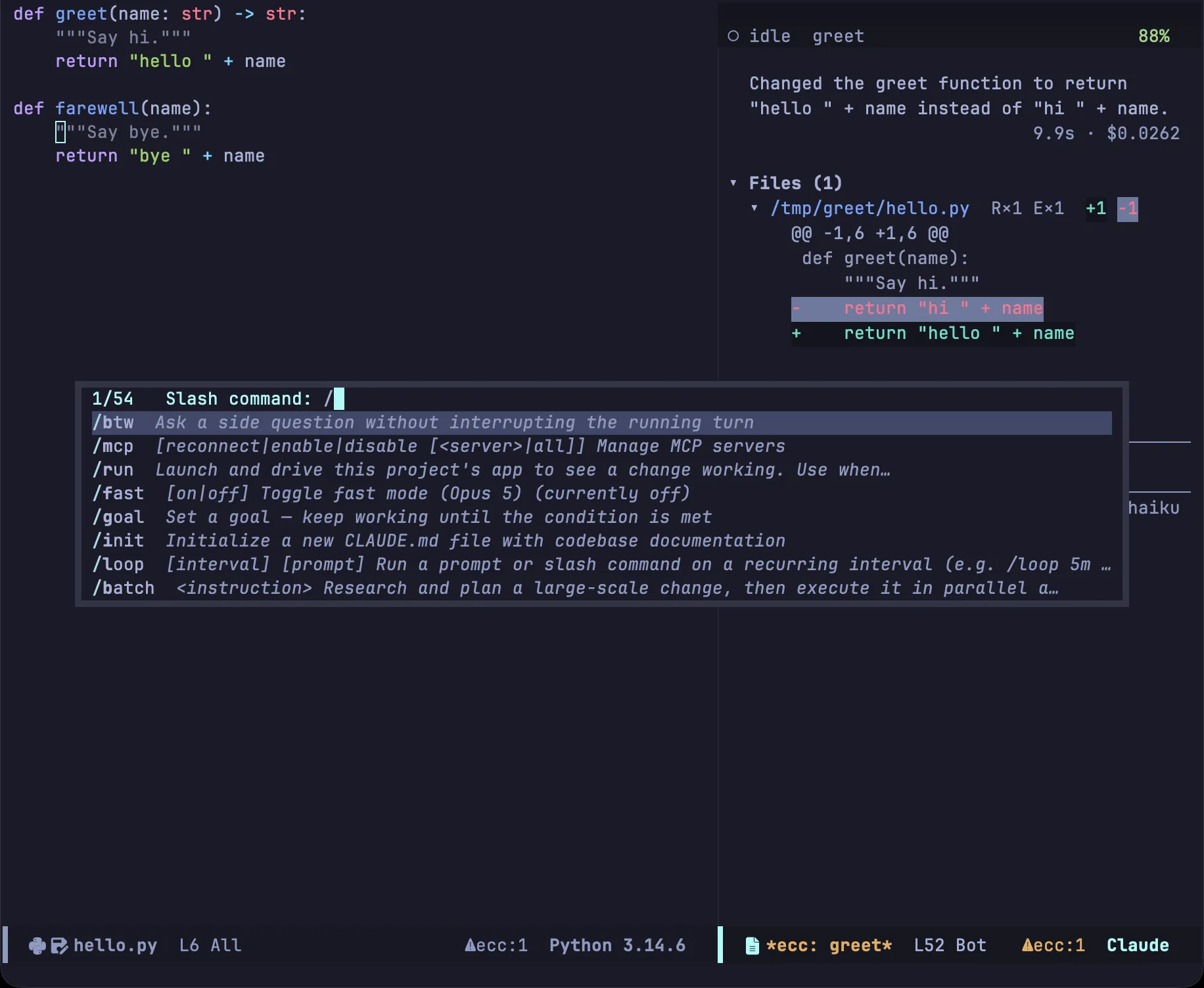
Typing / at the beginning of the prompt displays the command menu; TAB completes slash commands anywhere in the prompt. Each command includes its description from the CLI.
/model, /effort, /permissions, /config, and /btw prompt for their argument first, as the CLI responds with usage instructions when invoked without arguments. Terminal-only commands are omitted from the completion list, though you can still run them by typing the full command.
A few commands that the CLI doesn’t list are handled directly by Emacs and never reach the model: /btw, /hooks, /plugins, /login, /logout, and /auth-status.
Side questions with /btw
Section titled “Side questions with /btw”Sending /btw <question> runs a side-query without adding to the main conversation. Emacs intercepts the command and invokes a lightweight CLI instance that shares earlier context but runs without tool access. Neither the question nor the answer is recorded in the transcript or session history.
The active turn is not interrupted: the /btw response arrives in a separate view while the transcript continues streaming. Press C-c C-b to review session side-queries: a asks another question, c copies the answer, k cancels an in-flight query, x clears the list, and q dismisses the buffer. ecc-btw-display controls whether responses appear in a floating popup (via posframe) or an ordinary window.
/btw queries are single-shot: follow-up questions include only the last few exchanges (ecc-btw-history-limit).
While a turn runs

Section titled “While a turn runs”Prompts sent while Claude is working are queued rather than interrupting the turn; the echo area reports the queue position. Press C-c C-q to view the queue. Turns initiated via Remote Control are queued the same way and identified in notifications.
Images and editor context
Section titled “Images and editor context”Images pasted, dragged into the buffer, or inserted with C-c C-i are saved under ecc-image-dir and passed to the CLI as file paths. ecc-image-cleanup determines whether session images are deleted when the session ends.

C-c C-x toggles editor context for the buffer: when enabled, the current file and line number are automatically included with each prompt.
The footer
Section titled “The footer”Below the prompt area sits a horizontal divider, showing the current permission mode on the left and the active model on the right. S-TAB cycles through default, acceptEdits, plan, and auto. (bypassPermissions is omitted from the cycle to avoid accidental activation; use ecc-set-permission-mode to select it). An empty prompt area displays placeholder text rendered via overlays rather than buffer text.
The transcript
Section titled “The transcript”
The transcript is standard read-only buffer text, so isearch, occur, narrowing, and M-w work just as they do anywhere in Emacs.
Folding
Section titled “Folding”| Key | Action |
|---|---|
TAB |
Fold or unfold node at point |
1–4 |
Expand tree to specified depth |
+ / - |
Expand or collapse all nodes |
Navigation
Section titled “Navigation”| Key | Action |
|---|---|
n / p |
Next or previous heading |
M-n / M-p |
Next or previous sibling at current depth |
^ |
Up to parent heading |
] / [ |
Next or previous block |
T |
Jump to turn by prompt |
f / P |
Jump to Files section / Plan section |
SPC / DEL |
Scroll down / up |
i |
Move point to prompt area |
Acting on items at point
Section titled “Acting on items at point”| Key | Action |
|---|---|
RET |
Visit item at point (link, file, subagent transcript, or full tool result) |
mouse-1 / mouse-2 |
Follow the link that was clicked |
w |
Copy code block at point (or entire response) |
a |
Allow pending request |
d |
Deny request at point (or view diff if not on a request) |
g |
Redraw transcript |
L |
View raw protocol log |
t / R |
Hand over to terminal client / resume session |
C-c C-k |
Interrupt running turn |
S-TAB |
Cycle permission mode |
q |
Bury buffer |
? |
Open transient menu |

On a pending request node
Section titled “On a pending request node”Nodes awaiting user input have an active local keymap when point is inside them:
| Key | Action |
|---|---|
RET |
Inspect proposal (opens an answer buffer for questions) |
a / d |
Allow once / deny |
A |
Always allow this tool for the session |
u |
Allow all requests until current turn finishes |
r |
Allow matching rule (saves pattern to project settings) |
c / e |
Comment on proposal / edit before allowing |
These bindings use keys unassigned elsewhere in the transcript so existing commands are never shadowed. Because point position selects the active keymap, commands are strictly scoped to avoid accidental triggers. See Review and plan mode for details on c and e.
Questions are answered in a dedicated buffer opened with RET: press 1–9 to choose an option, SPC to toggle multiple-choice items, o to type a custom answer, and C-c C-c to send.

Files section
Section titled “Files section”RET visits the selected file and d reviews its modifications in diff-mode. TAB toggles folding and SPC scrolls.
All commands accessible outside the session buffer are documented in the transient menu reference.