Review and plan mode
Review changes as a single diff, comment on hunks that need work, and send all comments in a single prompt. The same buffer reviews what a session changed, the working tree it modified, or a single proposal before it is applied.
Reviewing session changes
Section titled “Reviewing session changes”Press D in the transient menu, type C-c c D, or run M-x ecc-review. A prefix argument (C-u D) prompts for specific files.

Files tracked by Git are diffed with git diff, uncommitted local changes included. Untracked files and files outside a repository are diffed against their state before the session’s first change.
| Key | Action |
|---|---|
c |
Comment on the hunk at point (again to edit it) |
l |
Jump to a comment |
d |
Remove the comment on this hunk |
e |
Edit the proposed content (reviewing one proposal) |
C-c C-c |
Send the comments as a prompt |
C-c C-k |
Drop the review and its comments |
g |
Read the diff again |
q |
Bury the buffer |
The buffer uses read-only diff-mode, so n, p, and RET move between hunks and jump to source. A commented hunk displays a bold header, the comment below it, and the count in the header line.
C-c C-c collects the comments into a single prompt to confirm:
## hello.py L1-L6```diff def greet(name): """Say hi."""- return "hi " + name+ return "hello " + name```Comment: the docstring still says hiEdit it if you like; C-c C-c sends the prompt, while C-c C-k returns to the diff.
Reviewing the working tree
Section titled “Reviewing the working tree”ecc-review covers only what the session edited or wrote. For changes you made yourself, press G in the menu, type C-c c G, or run M-x ecc-review-worktree.
This diffs the project’s entire repository against HEAD — every uncommitted change, staged or unstaged, plus the untracked files (those .gitignore excludes are left out; a binary file, or one larger than ecc-review-untracked-max-bytes, is named rather than printed). C-u G prompts for what to diff against: a revision, a range such as main...HEAD, or nothing for unstaged changes.
The project is determined by the current buffer, and comments go to that project’s session. If none exists, ecc offers to start one, which is the usual entry point. Commenting and sending work as described above, and the two reviews use separate buffers.
Hunks are as small as the change itself, since a comment includes the entire hunk it annotates. Setting (setq ecc-review-context-lines 3) widens them: the value is passed to git as -U when ecc runs it, so no git config is read or written. Proposals retain three lines of context either way via ecc-review-proposal-context-lines.
Reviewing proposals before approval
Section titled “Reviewing proposals before approval”
While a tool permission request is pending in the transcript, pressing c on the request node reviews that change, and e opens its proposed content (see Prompt and transcript).
Comments here are sent as the reason for the deny, allowing Claude to propose again rather than being corrected after the write.
e opens the proposal in the target file’s major mode. C-c C-c allows the change using your text instead of Claude’s and sends a diff of what you altered; C-c C-k leaves the request pending.
Plan mode
Section titled “Plan mode”Exiting plan mode sends the plan as a request. ecc opens it in an editable buffer beside the session.

Feedback can take three forms: a line comment (C-c C-a, removed with C-c C-r), an inline @claude: … marker, or an edit to the plan itself (C-c C-d diffs it).
With any feedback present, C-c C-c returns the plan with it and requests a revision. Without feedback, it approves and prompts for a permission mode: C-c C-p chooses one; otherwise, ecc-plan-default-mode ("acceptEdits") is used.
| Key | Action |
|---|---|
C-c C-c |
Approve, or send the feedback there is |
C-c C-k |
Reject with a reason, feedback included |
C-c C-a / C-c C-r |
Add or remove a comment on this line |
C-c C-d |
Diff your edits against the plan as proposed |
C-c C-p |
Choose the permission mode to approve with |
C-c C-n |
Next line changed since the previous plan |
A new plan marks changed lines in the margin and shows +N −N in the header line.
The Files section
Section titled “The Files section”
The bottom of the transcript lists the files touched during the session: the path, operations performed (R×n reads, E×n edits, W×n writes), and lines changed (+n −n). TAB expands a file’s cumulative diff, RET visits it, and d reviews it on its own.
Pressing f in the transcript (or F in the menu) jumps there. Setting ecc-render-summary-position to 'top places the section at the top instead.
The Timeline
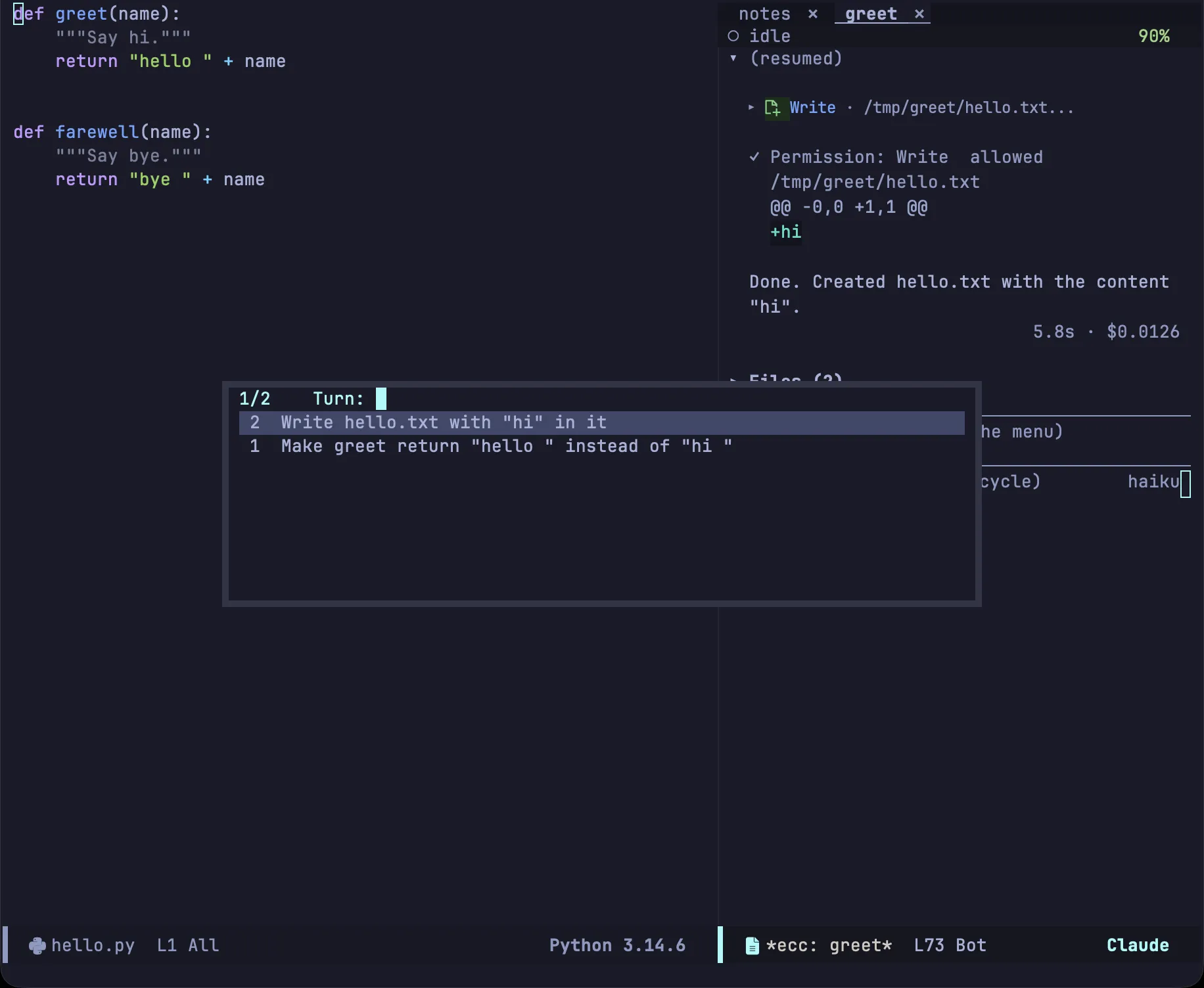
Section titled “The Timeline”T in the transcript lists turns by their prompts and jumps to the selected one. C-c C-n and C-c C-p step through them.
Window placement for reviews
Section titled “Window placement for reviews”Reviews require screen space, which two variables control:
| Variable | Description |
|---|---|
ecc-window-hide-on-review |
'project hides the sessions of this project, 'all every session, nil none |
ecc-window-review-focus |
'review focuses the review, 'session keeps point in the transcript, nil leaves focus alone |
ecc-toggle restores this project’s session windows, and ecc-toggle-all restores every project’s. The remaining options are in the configuration reference.