Spaces and worktrees
A Space is a project with an Emacs tab of its own. A tab is a named window arrangement of the frame; whether the strip at the top of the frame is drawn is tab-bar-show’s business. A git worktree is its own Space, shown under the repository it came from.
ecc-use-spaces is on by default. Turn it off for the older layout: transcripts in side windows, with no tabs, no sidebar, and no worktree commands.
(setq ecc-use-spaces nil)How a Space works
Section titled “How a Space works”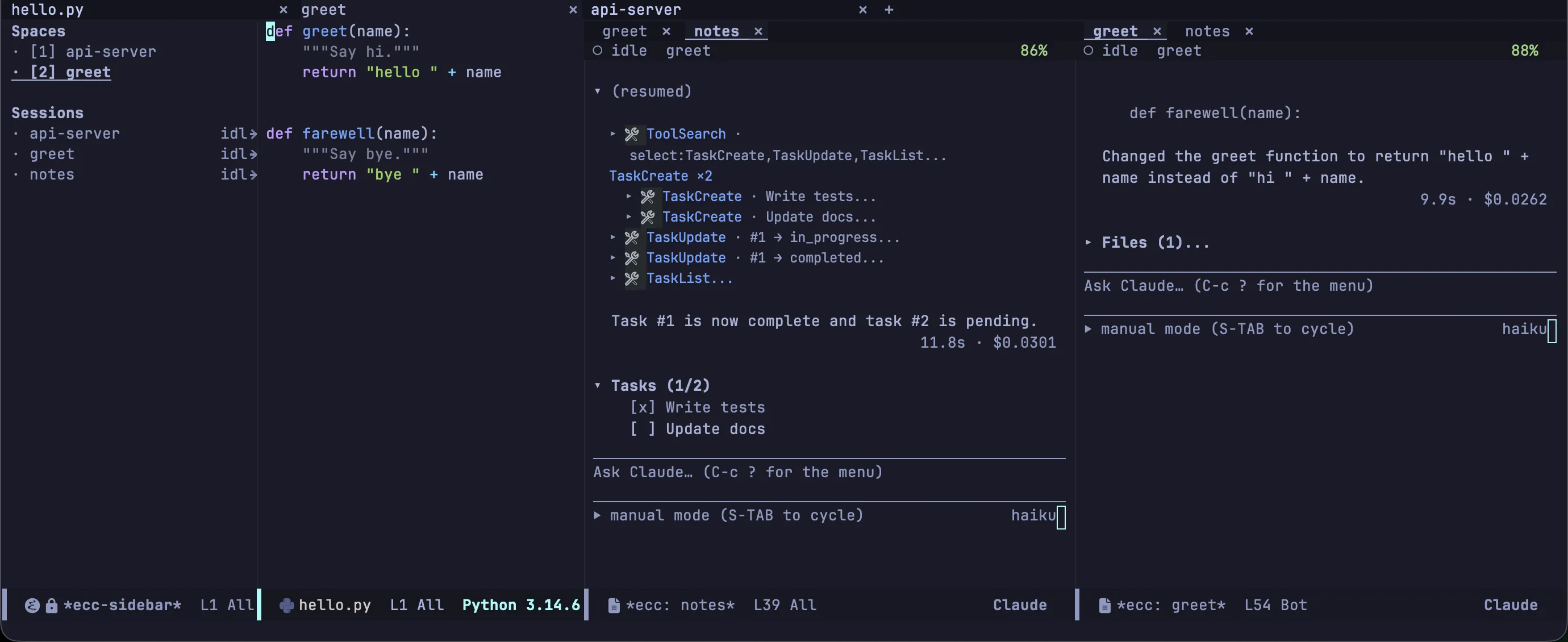
┌ *ecc-sidebar* ─────┬ tab bar: [ecc] [herdr] [feat-x] ────────────────────┐│ Spaces │ ┌ source ─────────┬ session-A ────┬ session-B ────┐ ││ ⚠ [1] ecc ▾ │ │ │ (tab line) │ (tab line) │ ││ main ↑2 ↓0 │ │ │ │ │ ││ └─ ▶ [2] feat-x │ │ │ │ │ ││ · [3] herdr │ └─────────────────┴───────────────┴───────────────┘ ││ master │ ││ │ one Space = one tab = one window arrangement ││ │ ││ Sessions │ ││ ⚠ ecc waiting │ ││ ▶ ecc-2 running │ ││ · herdr idle │ │└────────────────────┴─────────────────────────────────────────────────────┘Transcripts sit side by side: the first opens to the right of the source, each one after it splits the rightmost window, and nothing is ever stacked. From there they are ordinary windows, yours to split, move, enlarge, and close. A tab is a window configuration, so leaving a Space and coming back restores it. The tab line inside a transcript still switches between that project’s sessions.
No transcript is made narrower than ecc-space-session-min-width. When the row is full, the session worked in longest ago gives up its window and keeps running without one; the sidebar or C-c c V brings it back.
Going to a Space with nothing running starts a session there — ecc-space-always-session, on by default, which also closes a Space when its last session is killed. Type /resume in the session that opens to carry on an earlier conversation. Turn it off and a Space opens on the source alone and stays until you kill the project’s last buffer.
| Key | Command | What it does |
|---|---|---|
C-c c j |
ecc-space-goto |
Go to a Space by name, including a project that only has recordings |
C-c c z |
ecc-space-zoom |
Fill the tab with this window; press the same key to restore the windows |
C-c c V |
ecc-space-reset-windows |
Reset this Space to the layout of a new tab: the source on the left, transcripts beside it |
C-c c ? then X |
ecc-space-close |
Close this Space and stop everything running in it — including its worktrees, if it is a repository — then offer to remove the closed worktrees |
| — | ecc-space-jump |
Go to the Nth Space, as numbered in the sidebar |
The bar itself is yours
Section titled “The bar itself is yours”tab-bar-mode only draws the strip above the tab, and nothing here turns that mode on: tab-bar-new-tab does where tab-bar-show is t, its default, and leaves it off where you set that to nil.
(setq tab-bar-show nil) ; Spaces with no strip at the top of the frameWith the bar hidden the tabs are made, named, switched and closed exactly as before, and the sidebar is the list of them.
The sidebar
Section titled “The sidebar”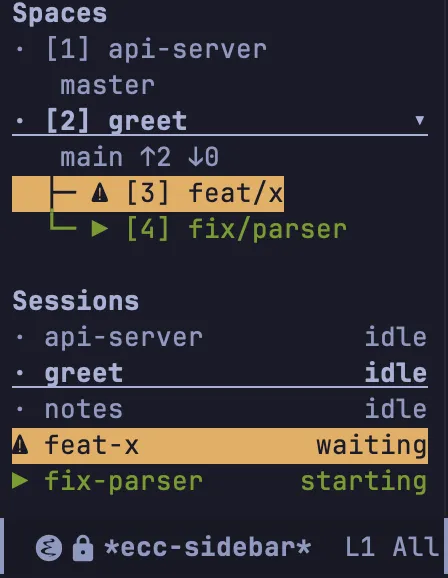
C-c c b (ecc-sidebar-focus) opens the sidebar and puts point in it; the same key puts point back.
The top half lists the Spaces: a mark for what the Space is doing, the number the 1-9 keys take, and the name. Under a repository come its branch and how far it is from its upstream, and its worktrees hang on a tree line below it, each named by its branch; TAB folds them away.
The bottom half lists the sessions, each with its mark, its name and what it is waiting for. The marks, the colours and the blink are the tab line’s, so a session says the same thing wherever it is drawn.
| Key | What it does |
|---|---|
RET |
Go to the Space or session on this line |
n, p |
Next, previous row |
TAB |
Fold or unfold a repository’s worktrees |
1–9 |
Go to the Space with that number |
c |
Start a session in this Space |
W |
Create a worktree from this Space and start a session there |
k |
Stop this session |
K |
Remove this worktree’s directory |
X |
Close this Space |
a, d |
Allow or deny what this session is waiting on (asks first; not for Bash) |
g |
Refresh git status and redraw |
q |
Hide the sidebar |
a and d behave exactly as the dashboard’s do: see Sessions. ecc-sidebar-width is the width in columns, 28 by default. ecc-sidebar-sessions-sort orders the bottom half: spaces (the default) keeps sessions under their Space, priority puts what wants an answer first.
Worktrees
Section titled “Worktrees”A git worktree is a second working tree for a repository, on a branch of its own: two sessions work on the same project without seeing each other’s edits. These commands work with ecc-use-spaces on or off.
| Key | Command | What it does |
|---|---|---|
C-c c ? then W c |
ecc-start-worktree |
Check out a branch beside the repository and start a session there |
C-c c ? then W o |
ecc-start-in-worktree |
Start a session in an existing worktree |
C-c c ? then W k |
ecc-remove-worktree |
Stop the sessions running in a worktree and remove it |
ecc-start-worktree asks for a branch, offering the ones that exist. An existing branch is checked out as it is; one that does not exist is created from HEAD. A branch that another worktree already holds is not refused: ecc asks, then starts the session in that worktree. It finds the worktree by its branch, so the directory can be named anything.
Worktrees are placed in ecc-worktree-directory, .claude/worktrees by default. A relative path hangs off the repository, so a worktree for feat/x lands at <repo>/.claude/worktrees/feat-x; an absolute one is shared by every repository, and a worktree lands at <directory>/<repository>/<branch-slug>.
When the last session working in a worktree ends, however it ended, ecc offers to remove the worktree. No branch is ever deleted: ecc-remove-worktree removes a directory, so nothing committed can be lost. If git refuses to remove a worktree because it holds uncommitted changes or untracked files, ecc names the directory and asks again; only then is the removal forced.
Handing work to a session in a worktree
Section titled “Handing work to a session in a worktree”Ask inside a session for something to be done in a worktree and the CLI, left to itself, runs git worktree add and carries on in the same conversation: one session, two worktrees.
With the Emacs MCP server on (ecc-mcp-enabled), the model is offered start_worktree_session instead. It names the branch and writes a brief; Emacs makes the worktree, opens it as a Space, starts a session there and sends it that brief. Emacs adds what it watched the conversation do: the files it touched, the plans it wrote, the path of the recording, and the changes that are still uncommitted. The worktree is made from HEAD, so commit that work first or say so in the brief. If the model tries to make a worktree itself instead of calling the tool, Emacs refuses the request and tells it to use the tool. You see no permission prompt for it.
A draft of yours that mentions a worktree is sent with one extra line reminding the model of the tool. You did not write that line, so the transcript keeps it out of your prompt and shows it folded underneath as “1 line Emacs added”.
If the branch the model names is already checked out in another worktree, the tool refuses and asks it for a different branch: two sessions in one worktree is not what handing work over means. From Lisp the command is ecc-worktree-delegate; there is no M-x for it.
A session started in a worktree opens a Space of its own, under the repository it came from.